SKU
513156

Brodit Festeinbau Halterung Symbol MC9500

Preis 111,95 €
Nicht auf Lager
-
+
  • Schneller Versand
  • Hochwertige Produkte
  • Sichere Zahlung
Details
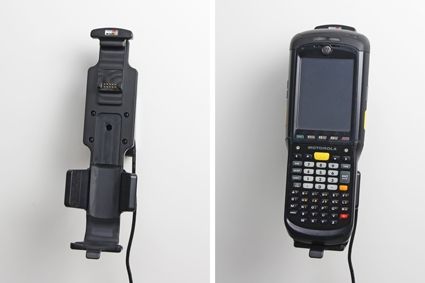
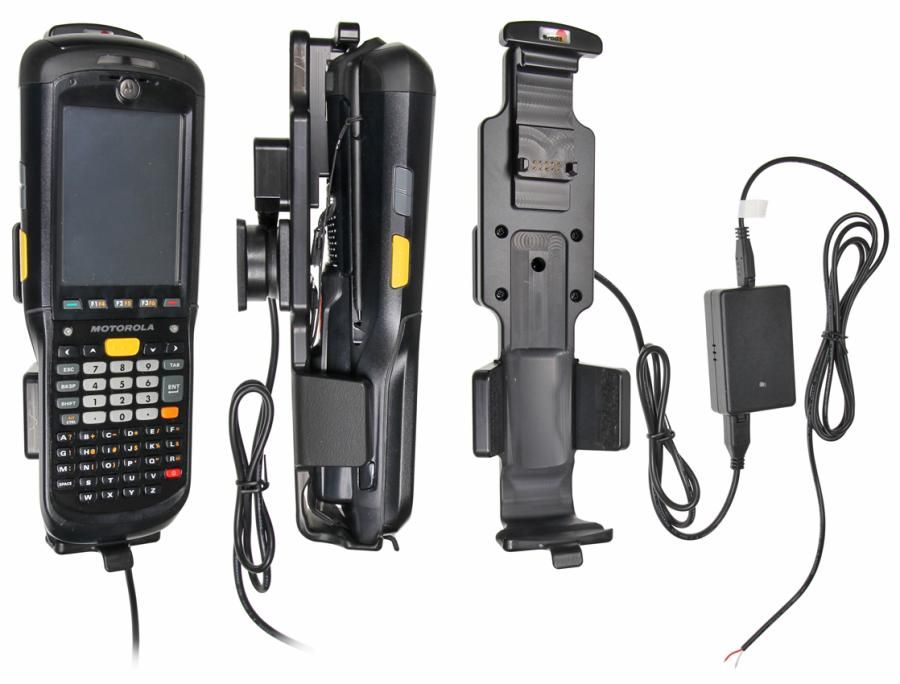
Dieser Brodit-Halter / Ladegerät ist mit einem festen Installationsanschluss zum Laden Ihres Geräts ausgestattet. Der Ladevorgang beginnt, sobald Sie das Gerät in die Halterung legen. Auf der Rückseite des Halters befindet sich ein Drehmechanismus, so dass der Halter in einem anderen Winkel eingestellt werden kann, um störende Reflexionen auf dem Gerätebildschirm zu vermeiden. Die Installation ist einfach und schnell. Kommt mit detaillierten Installationsanweisungen und besteht aus schwarzem ABS-Kunststoff.
Weitere Informationen
Zubehörmarke Brodit
Barcode 7320285131569
Empfohlener Verkaufspreis inkl. MwSt 111,95 €
Gerät mit oder ohne Hülle ohne Deckel
Haltereigenschaft Toestelspecifiek
Cable / Qi / charger type / connnector Molex, fixed install
Gerät laden über Pogo / Pins
Stromspannung 12/24V
Voltage (output) 4.75 - 5.25V
Max Amperage 2,0 Amp
Montage standaard AMPS
Halterschloss nein
Color zwart
Produktinformation Professioneller Halter mit Drehgelenk für Ihr Smart Device. Störende Bildschirmreflexionen werden durch Einstellen des Halterungswinkels reduziert
Produktinstallation Montieren Sie den Halter an einem ProClip in Ihrem Fahrzeug. Eine ausführliche Installationsanleitung ist in der Produktverpackung enthalten
Produkt geeignet für info Überprüfen Sie auf der Registerkarte Kompatibilitätsliste, ob ein Smartphone, ein Navigationssystem oder ein Tablet für diesen Halter geeignet ist
Item Returns This item can be returned
Mehr anzeigen + Zeige weniger -
Compatibility
Mehr anzeigen + Zeige weniger -
Instruction
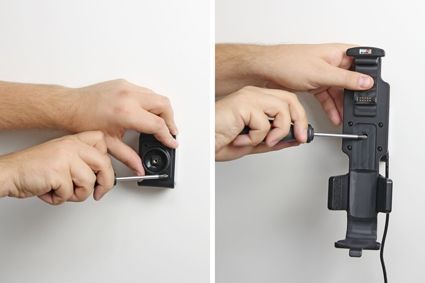
Please read all of the instructions and look at the pictures before attaching the holder. Important Note: The charger unit is fused internally with 2 A automotive re-settable thermal fuse, but if an external fuse is to be installed then connect a 2 A fuse holder and fuse inline with the Red wire close to the power source. Route the cable from the holder into the vehicle dashboard and secure the charger unit in place with the adhesive tape provided. Ensure the charger unit is securely mounted behind the dashboard in a well ventilated area that does not get hot! Note: If you are connecting a GPS/Data device to the holder please ensure the charger unit is located in a position within easy reach of any GPS or charging adapters. Route the power cable from the charger unit to the power supply source in the vehicle and connect as follows: 1. Connect the White wire to a Negative Ground connection of the vehicle or the vehicle chassis. 2. Connect the Red wire to a 12/24 Volt power supply in the vehicle that is controlled by the ignition switch of the vehicle. Installation of the holder:1. Loosen the screw in the center of the holder so you can remove the tilt swivel attaching plate on the back.
2. Place the attaching plate onto the desired position. Screw the attaching plate into place. Place the holder over the attaching plate so the screw fits in the hole in the tilt swivel. Tighten the screw so the holder is firmly in place, but still can be adjusted.
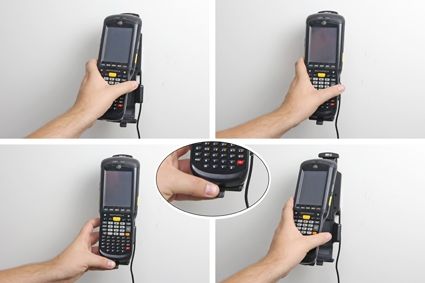
3. To place the device in the holder: Place the upper part of the device in the holder, then flip/press the lower part forwards so it snaps into place in the holder. To remove the device from the holder: Press upwards on the upper part of the holder, in the same time pull the upper part of the device out from the holder and then lift the device up and out from the holder.
4. The holder is in place.
Scroll to top